 Tempor
The Real Cost of Paper Timesheets for UK Construction Firms
Ask most construction or field-service owners how many hours their team worked last week and you'll get a confident answer. Ask them to prove it, and the confidence tends to fade. That gap — between what's written down and what actually happened — is where the money goes. This article looks at why paper timesheets fail structurally rather than dishonestly, what that costs in practice, and what a verified alternative looks like.
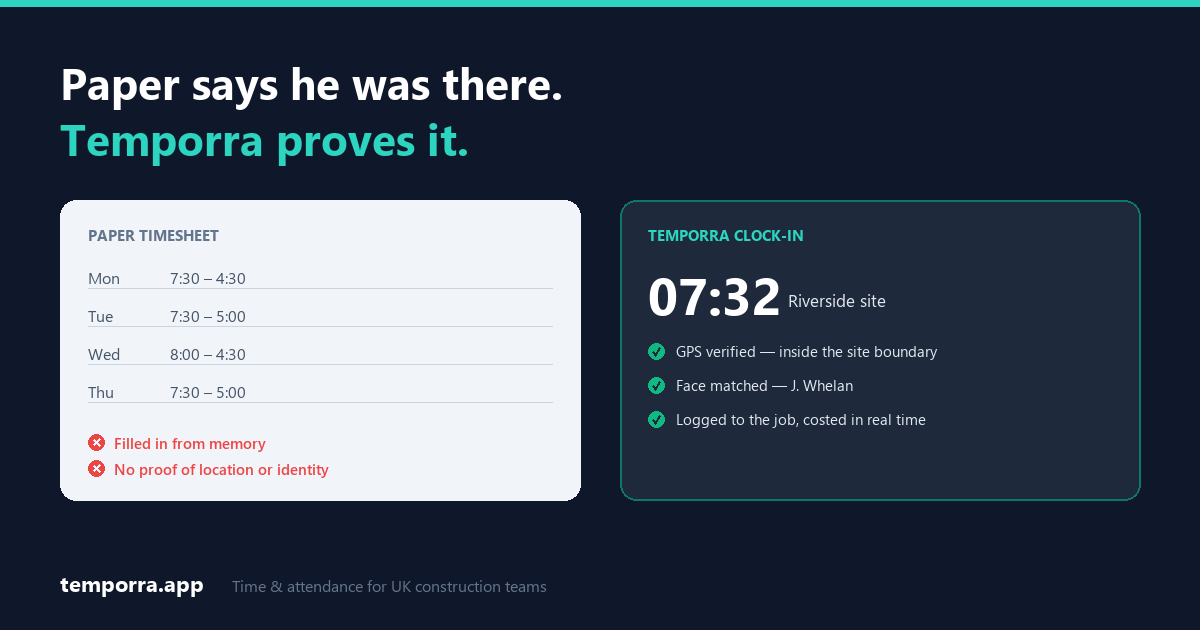
The problem isn't dishonesty — it's the paper
It's tempting to frame timesheet problems as a trust issue. That's usually the wrong diagnosis, and it leads to the wrong fix. Paper fails for four structural reasons, and they apply just as much to a completely honest crew.
1. They're filled in from memory
A worker completing Friday's sheet is reconstructing Tuesday morning from recall. Recall rounds up — not maliciously, but consistently, and almost always in the same direction. A start that was really 07:38 becomes "half seven". A finish at 16:20 becomes "half four". Nobody is lying; the instrument is just imprecise, and the imprecision has a bias.
Across a dozen workers and fifty working weeks, small consistent rounding compounds into a meaningful number of paid hours that nobody actually worked.
2. They can't be verified
A signature at the bottom of a sheet confirms that someone wrote something down. It doesn't confirm they were on site, it doesn't confirm when they arrived, and it doesn't confirm that the person being paid is the person who did the hours. If a client queries a line on an application for payment, a signed paper sheet isn't evidence — it's an assertion.
This is also the gap that lets buddy punching go undetected: one person signing in for another is invisible to any paper system.
3. They arrive too late to be useful
If you discover a job ran over on labour when the sheets are totalled at month end, the money is already spent. That isn't a costing problem — it's a timing problem. Labour is usually the largest controllable cost on a job, and it's the one you find out about last.
Knowing on a Wednesday that a job is tracking 15% over on hours gives you options: rescope, move a pair of hands, raise a variation. Knowing three weeks later gives you a lesson.
4. They generate work that produces nothing
Someone has to collect the sheets, chase the missing ones, decipher the handwriting, key the totals into payroll, and reconcile it when it doesn't add up. That's skilled admin time every single week, and none of it creates value — it just converts paper into numbers. On a small firm it's often the owner or office manager doing it on a weekend.
Where the cost actually shows up
| Failure | How it shows up in the accounts |
|---|---|
| Rounding from memory | Paid hours consistently exceed worked hours, invisibly |
| No location proof | Disputed lines on applications for payment; travel and site time you can't substantiate |
| No identity proof | Hours paid for people who weren't there |
| Late job costs | Overruns found after they're unrecoverable |
| Manual re-keying | Weekly admin hours, plus payroll errors and the time spent fixing them |
| Missing certification records | Workers turned away at the gate; compliance gaps found during audits |
Note what's missing from that list: fraud. It's real, and identity verification addresses it, but for most firms the quiet, structural losses in the other rows add up to more than deliberate abuse ever does.
What changes when the clock-in verifies itself
The fix isn't "a digital version of the same sheet". A spreadsheet still gets filled in from memory and still can't prove anything — it just moves the problem into Excel. What changes the outcome is capturing the clock-in at the moment and place it happens, with proof attached.
Temporra is built for this specific problem — UK construction and field-service teams, where the workforce is spread across sites and the office never sees anyone clock on.
- GPS geofencing — virtual boundaries around each job site. The clock-in is checked against the site's location before it's accepted, so "I was there" becomes a record rather than a claim.
- Facial verification — each clock-in is matched against a registered face photo. This is the part that closes buddy punching, because location alone can't: someone genuinely on site can still clock in for someone who isn't.
- Live job costing — labour tracked against each project's budget as it accrues, so an overrun surfaces while you can still act on it.
- Payroll export — hours, overtime and gross pay exported straight into Sage, Xero or BrightPay. The re-keying step disappears, and with it the errors it introduced.
- Document expiry alerts — CSCS cards, certificates and contracts held against each worker's profile, with warnings before they lapse rather than the morning someone is refused entry.
- Kiosk mode — a shared tablet at the gate or in the cabin, with PIN access, for crews who don't want to use their own phones.
Around that sit the day-to-day essentials: shift scheduling, digital leave requests with approval, permit management, a live map of where the workforce is, an attendance calendar, and in-app messaging so site and office aren't chasing each other across WhatsApp.
Frequently asked questions
Are paper timesheets still legal in the UK?
Yes. There's no requirement to use software. UK employers must keep adequate records of hours and pay, and keep working-time records, but the format is up to you. The problem with paper is practical rather than legal — a paper record is hard to verify and easy to dispute.
How long do UK employers need to keep timesheet records?
Payroll records generally need keeping for at least three years from the end of the tax year they relate to, and National Minimum Wage records for six years. Retention periods differ by record type, so check the current requirements on gov.uk.
What actually stops someone clocking in for a colleague?
Location alone doesn't, because a worker who is on site can clock in for someone who isn't. Identity verification is what closes it — matching each clock-in against a registered face photo, so the person clocking in has to be the person being paid.
Does it work on sites with poor mobile signal?
Signal on site is genuinely patchy, which is why a shared tablet in kiosk mode at the gate or in the cabin is often used alongside workers' own phones. If connectivity is a real concern for your sites, test it during the free trial on the sites you actually work on — that's a more honest answer than a blanket promise.
The honest version
Time tracking software doesn't make a badly run job profitable, and no app fixes underpricing. What it removes is the guesswork: the hours you pay for are hours that were worked, the job costs you see are current rather than historic, and the admin time that went into shuffling paper goes somewhere it earns something.
If you're still running site hours on paper or a spreadsheet, that's worth a fortnight of your attention.
Related guides
- How to Stop Buddy Punching on UK Construction Sites
- Free Construction Timesheet Template
- How to Track Employee Hours: A UK Small-Business Guide
- Payslips and hours worked: what the law actually requires
Start a free 14-day trial · Book a demo
No card required. Flat monthly pricing by team size, every feature on every tier — see pricing.