 Tempor
Live job costing for UK trade and construction teams: catching quote overruns before payroll day
If you only add up labour hours when you run payroll and CIS at the end of the month, you find out a fixed-price job went over budget when the work is finished and you cannot bill a penny of it. Here is how live job costing works on site, what it stops, and how it pays for itself on a single variation.
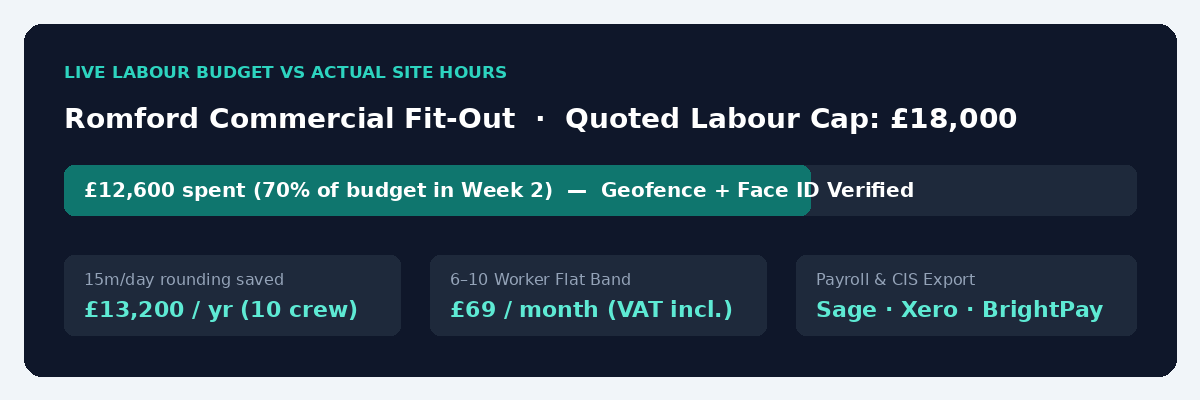
Most small electrical, plumbing, and construction firms in the UK do not go broke because they cannot win work. They lose their margin because they price a four-week job for £18,000 of labour, collect hours on Friday afternoon by WhatsApp or paper sheets, and only add up what the job actually cost when the bookkeeper runs payroll and CIS at the end of the month. By the time you see that the crew spent £21,400 on site, the plasterboard is up, the client has signed off, and you cannot raise a variation order for a single penny of the extra £3,400.
We built Temporra alongside STF Electrics, a working UK electrical contractor, to solve that exact problem. When every clock-in on site automatically multiplies that worker’s hourly or day rate against the job’s labour budget in real time, you spot a losing quote on Tuesday of week two, while you still have two weeks left to fix it or bill the client for the extra work.
Why Friday timesheets always tell you the truth too late
Think about how a fixed-price commercial fit-out or rewire usually runs when a company relies on messages and spreadsheets.
On Monday of week one, the client’s site manager asks your supervisor to move six containment runs because the ductwork drawings changed. Your lads get on with it to keep the job moving. Nobody writes down that the change took four electricians an extra day and a half.
On Friday afternoon, the hours arrive in a WhatsApp group: “Mon to Fri, 8 till 4:30, Romford job.” Even if your office manager types those numbers into Excel on Monday morning, they go in as a flat payroll total for each worker, not broken down against the quoted labour cap for that specific job. You pay the lads on Friday, pay the CIS deductions on the 19th, and only realise the Romford quote lost three grand when your accountant shows you the quarterly profit and loss.
End-of-month spreadsheet costing vs live job costing in Temporra
When you tie GPS-geofenced clock-in directly to a job budget, the numbers move from a post-mortem to a live dashboard:
| What happens on the job | WhatsApp / Paper + End-of-Month Excel | Temporra Live Job Costing |
|---|---|---|
| When you see the labour cost | 2 to 4 weeks after the shifts were worked | The minute each worker clocks out |
| Client changes the scope mid-week | Extra hours get buried inside a flat 40-hour Friday text message | You see the job hit 70% of its labour budget by Wednesday and raise a variation with timestamped proof |
| Workers move between two sites in one day | The whole day gets billed to whichever site they finished at | Separate geofenced clock-ins split the morning and afternoon cost cleanly between both jobs |
| 15 mins/day of arrival & finish rounding | Costs ~£13,200/year across a 10-person crew at £22/hr | £0 (Postcode geofence + optional Face ID / Kiosk PIN logs exact minutes) |
| Monthly software cost for 6–10 workers | £0 on paper, thousands lost in unbilled overruns | £69 / month flat (VAT included) |
How Temporra tracks a job budget without extra site admin
Site supervisors hate paperwork. If a job-costing tool asks a working foreman to fill in cost codes on a spreadsheet every evening in the van, they will stop doing it by Thursday. Temporra works without asking the crew to do a single extra tap.
When you set up a job in Temporra, you type the site postcode, set the geofence radius (200 metres by default), and enter your labour budget for the project. Each employee or CIS subcontractor already has their hourly rate, overtime threshold, or day rate saved against their profile.
In the morning, the crew arrive at the postcode and tap Clock In on their phones (or enter their four-digit PIN on a shared tablet running Kiosk Mode in the site cabin). When they clock out, Temporra already knows who they are, which job they were on, how many regular and overtime hours they worked, and what those hours cost you in pounds and pence. Your dashboard shows a live bar of labour spend against the budget you set for that job.
Turning timestamped hours into client invoices and CIS statements
Catching an overrun early does two things for your cash flow. First, if a job is running slow because materials are late or access is blocked, you can step in on day three instead of day twenty.
Second, when you do day-rate or variation work for a main contractor, arguments over hours vanish. Instead of sending an invoice that just says “40 hours labour – £1,400” and waiting three weeks while the quantity surveyor queries it, Temporra generates the invoice directly from the verified hours, showing each worker, each date, and the exact GPS and face-verified clock-in and clock-out times. At the same time, the same approved hours generate your monthly CIS payment and deduction statements and a one-click CSV export for Sage, Xero, QuickBooks, or BrightPay.
What it costs (and why we don’t charge per user)
Most construction software vendors charge per worker per month, then lock job costing and payroll exports behind an expensive “Pro” tier. Temporra includes every feature on every plan for one flat, VAT-included monthly fee by team band: £39 a month for up to 5 active workers, £69 a month for 6 to 10 workers, £129 a month for 11 to 20 workers, and £239 a month for 21 to 50 workers.
Your own admin login does not count as a worker, and if you sit in the 11 to 20 band with twelve regulars and bring on four temporary subbies for a busy month, your price stays at £129. You can check the full band breakdown on the pricing page.
Common questions
Do my workers see the hourly rates or the job budget on their phones?
No. Workers only see their own shifts, their own clock-in button, their leave requests, and any site documents or permits assigned to them. Pay rates, job budgets, client invoices, and labour margins are only visible to company admins and managers you grant permission to.
Can Temporra handle a worker who visits three different jobs in one day?
Yes. Each time a worker moves to a new site, they clock out of the first job and clock into the next one inside its postcode geofence. Temporra splits their wages accurately across all three job budgets on the same day while keeping their total daily hours together for overtime and payroll.
Does it work for both hourly staff and day-rate CIS subcontractors?
Yes. You can mix PAYE hourly workers and day-rate or hourly CIS subcontractors on the exact same job, and Temporra calculates the live labour cost for the project across both groups automatically.
Can we test it on a live job before paying anything?
Yes. Every new account starts with a 14-day free trial with all features unlocked and no payment card required. Set up one live job this week, put your crew on it, and watch the live labour budget bar for a fortnight before you decide.
Related guides
- The Real Cost of Paper Timesheets for UK Construction Firms
- Face ID and Geofenced Clock-In: What Temporra Checks
- How to Stop Buddy Punching on UK Construction Sites
- CIS Payroll for Construction: A Subcontractor Deductions Guide
We post each new guide on the Temporra Facebook page. Follow it there if you’d like the next one, and a like helps other UK employers find it.
Start a 14-day free trial →No card needed for the trial. One flat monthly price by team size, from £39 for up to five workers, VAT included. See pricing.