 Tempor
Stopped at the site gate: what one expired CSCS card or missing permit costs a UK trade crew
There is no grace period on an expired CSCS card at a Tier 1 turnstile. When a two-man van drives ninety minutes to a job and gets turned away at 07:45 because one card lapsed last week, you lose £600 of labour before breakfast. Here is how keeping CSCS expiry alerts, digital permits, and RAMS inside your clock-in app stops the mistake.
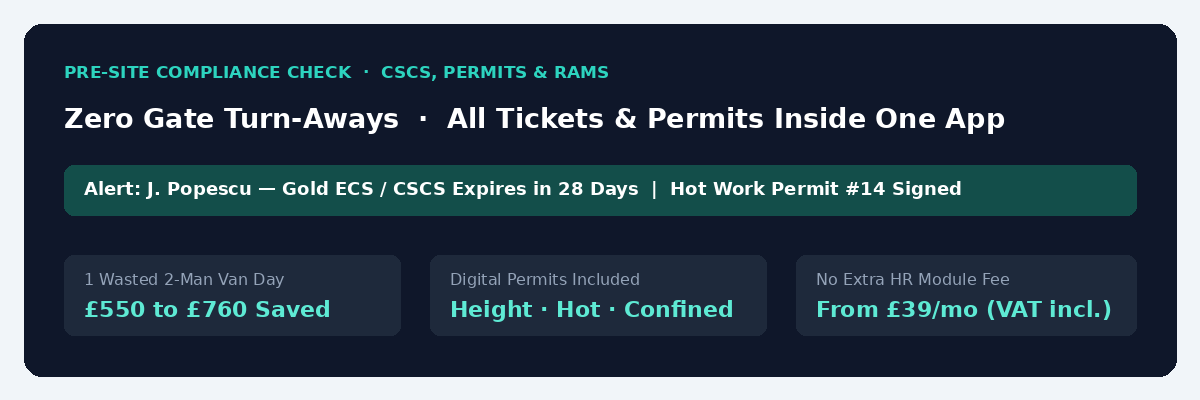
Nothing ruins a Monday morning faster than a phone call at 07:45 from your supervisor standing outside a main contractor’s gate in central London. Two of your lads just drove ninety minutes through the Blackwall Tunnel in a sign-written van, walked up to the biometric turnstile, and got turned away by the site manager because one operative’s CSCS card or IPAF ticket expired eleven days ago. There is no grace period on a Tier 1 site. You lose a £600 two-man day, you still have to pay the driver in the van next to him, you burn £45 in diesel and congestion charges, and you look disorganised in front of the client who hired you.
Even when everyone gets through the turnstile, a second paper bottleneck waits upstairs: two men standing idle with their drills in the box for ninety minutes while somebody hunts for a clipboard to sign off a Working at Height or Hot Work permit and the latest RAMS revision. We built document expiry alerts, digital site permits, and toolbox talk sign-offs straight into Temporra alongside STF Electrics so that preventing a single wasted morning at the gate pays for an entire year of the software.
Why spreadsheets and WhatsApp photos fail on CSCS and trade tickets
Every electrical, M&E, and construction boss starts out with the same system. When a new worker or CIS subcontractor joins, you ask them to send a photo of the front and back of their CSCS card, their ECS or JIB gold card, their PASMA or IPAF ticket, and their asbestos awareness certificate on WhatsApp. Someone in the office saves the photos into a folder on OneDrive and types the expiry dates into an Excel sheet.
Nobody opens that Excel sheet again until an auditor asks for it or a worker gets refused entry at a site induction. In 2026, with principal contractors checking cards electronically at the gate and old Industry Accreditation (“Grandfather Rights”) CSCS cards no longer eligible for simple renewal without an NVQ, finding out a card has lapsed on the morning the job starts is too late. Booking a fresh CITB Health, Safety and Environment test (£23.50) and applying for the £36 card takes days you do not have when the main contractor expects cables pulled today.
The cost of one gate turn-away vs Temporra
Compare what happens when certificates, permits, and RAMS live in scattered folders versus inside the same GPS-geofenced clock-in app your crew already open every morning:
| Site bottleneck | WhatsApp photos, paper folders & clipboards | Temporra Documents, Permits & RAMS |
|---|---|---|
| Lapsed CSCS, ECS, IPAF, or PASMA card | Nobody notices until the main contractor’s gate refuses entry | Automatic expiry alerts warn you before the card lapses |
| Cost of one 2-man van turned away at the gate | £550 to £760 lost in wages, delay, van fuel, and ULEZ/Congestion charges | £0 (check every worker’s live ticket status before you schedule them) |
| Hot work, working at height, or confined space permit | 90 minutes of paid electricians hunting for the site agent’s paper pad | Digital permit requested and signed off on the phone in two minutes |
| Toolbox talks & RAMS sign-off proof | A damp sheet of paper in the van that goes missing before an HSE or client check | Workers read and sign off on their phone (in 6 languages) with a permanent timestamp |
| Software cost for a 6–10 worker crew | £0 on paper, £600+ lost per gate mistake | £69 / month flat (VAT included, all features in the box) |
How certificates and expiry alerts work in Temporra
We did not build Temporra as a complicated corporate HR system. We built it for working trade teams who want the essentials in one place without paying for a separate compliance app.
Against each worker or subcontractor profile in Temporra, you store their CSCS or trade card details, upload copies of their certificates, and set the expiry date. Before a ticket runs out, Temporra flags the upcoming expiry on your dashboard so you can tell the operative to book their renewal while they still have weeks in hand.
When a main contractor’s health and safety manager asks for proof of competence before your crew arrives on Monday morning, you are not scrolling back through nine months of WhatsApp chats looking for a blurry photo of a blue card. Every ticket is sitting right next to that worker’s name.
Digital permits and RAMS sign-offs in six site languages
Getting past the gate is half the battle; getting started on the work safely is the rest. If your lads have to cut tray with a grinder, work off a tower scaffold, or enter a service riser, waiting around for a paper permit burns an hour of labour across a four-man crew before lunchtime.
In Temporra, digital permits for working at height, hot work, and confined spaces sit inside the same app the crew use to clock in. A worker or supervisor raises the permit on site, ticks through the safety checks, and gets it approved with a clear digital trail. You can also push out toolbox talks and RAMS documents for the crew to sign off on their phones.
Because UK construction sites rarely speak just one language, the worker app runs in English, Romanian, Polish, Bulgarian, Russian, and Italian. A Romanian or Polish operative can read and sign off their permit and clock into the job in their own language on their phone, while your office dashboard, live job costing, client invoices, and CIS statements remain in English.
Included free on every team band (no “HR Hub” add-on tax)
As we showed in our breakdown of per-worker pricing versus flat team bands, most workforce apps charge you once for time tracking and then demand an extra £2 to £4 per user (or a separate $49/month HR Hub subscription) just to track document expiry dates and safety forms.
On Temporra, documents, CSCS expiry alerts, digital permits, toolbox talks, GPS geofencing, Face ID, Kiosk Mode, live job budgets, and Sage/Xero/QuickBooks/BrightPay payroll exports are all included in one flat, VAT-included monthly price: £39 a month for 1 to 5 active workers, £69 a month for 6 to 10 workers, £129 a month for 11 to 20 workers, and £239 a month for 21 to 50 workers. See the full breakdown on our pricing page.
Common questions
Which types of site permits are built into Temporra?
Temporra includes built-in digital permits for hot work, working at height, and confined spaces, alongside toolbox talk and RAMS sign-off tracking.
Can we store IPAF, PASMA, and 18th Edition certificates as well as CSCS cards?
Yes. You can store CSCS, ECS, JIB, CISRS, CPCS, IPAF, PASMA, asbestos awareness, first aid, and trade qualification certificates against each worker profile with individual expiry alerts.
Do we pay extra for the documents and permits module?
No. Every feature in Temporra is included on every plan from the £39/month (1 to 5 workers) band upwards, with UK VAT already included in the price.
Can we test it with our crew for two weeks without a payment card?
Yes. You can start a 14-day free trial right now with no card required, upload your crew’s cards, set up your live jobs, and test the clock-in and permit workflows on site before you pay a penny.
Related guides
- Per-Worker Pricing vs Flat Team Bands: 2026 Cost Comparison
- Winning Main-Contractor Daywork and Variation Disputes
- Live Job Costing for UK Trade & Construction Teams
- Face ID and Geofenced Clock-In: What Temporra Checks
We post each new guide on the Temporra Facebook page. Follow it there if you’d like the next one, and a like helps other UK employers find it.
Start a 14-day free trial →No card needed for the trial. One flat monthly price by team size, from £39 for up to five workers, VAT included. See pricing.